
05Core
Partnership Tax Tables, Pivots & Exports
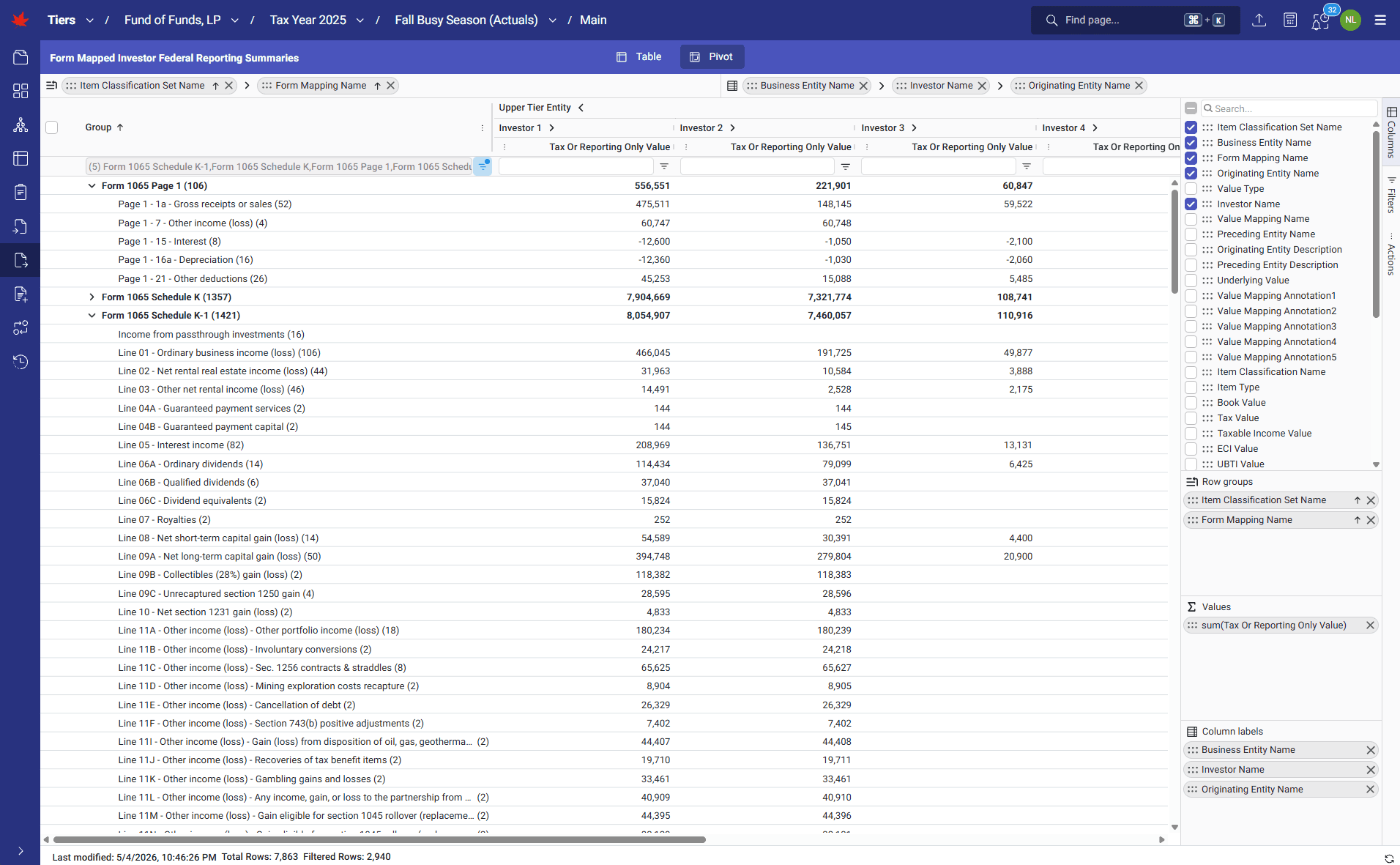
TIERS gives teams direct access to every input and output through configurable self-service tables, pivot views, and Excel or CSV exports. Users can review capital roll-forwards, scan K-1 allocations across an engagement, summarize high-volume output by entity, investor, K-1 line, and sub-line detail, and download data in formats designed for offline review or re-import.
How it runs
TIERS' tabular views read live datasets and let users slice and dice by selecting columns, specifying filter criteria, grouping rows and columns, drilling down, and viewing aggregate totals. Export actions produce structured Excel and CSV files for both inputs and outputs, preserving lowest-level detail for audit, review, and downstream analysis.
What it transforms
Opaque calculation outputs and disconnected review spreadsheets become a transparent data workspace. Teams can inspect the data behind the forms, preserve offline review packages, reduce black-box risk, and answer reviewer questions without leaving the production calculation.
Walkthrough
1 of 6 · CORE
Click to zoom. Scroll freely — pinch or Ctrl+scroll to zoom further. Drag when zoomed.
Next step
See TIERS with your data
Request a guided product briefing.