

01
Deterministic calculation
Partnership-tax logic runs through governed calculation infrastructure, not model improvisation.
01Trial Balance to 1065
TIERS helps CPA tax teams go from manual mapping, Excel adjustments, and reviewer archaeology to a governed Form 1065 workflow where prior-year mappings carry forward, values route consistently to Schedule L, Page 1, Schedule K, M-1, and M-2, and every line can be traced back to source.
Spend less time reconstructing the workpaper and more time applying judgment.
Built by the partnership-tax engineering team behind systems used by Big 4 and Next 10 firms.
02The Start of the Return
The trial balance is where the Form 1065 workflow starts — and where too many tax teams still rely on fragile handoffs.
This step is deceptively hard because the trial balance is not already a tax return. Book accounts have to be classified, mapped, adjusted, reconciled, and reviewed before they can become reliable Form 1065 output. Balance sheet accounts need to support Schedule L. Income statement accounts need to route to Page 1, Schedule K, M-1, and M-2. Prior-year treatment has to be preserved. New accounts need judgment. Adjustments need support. And every decision can affect the K-1 package downstream.
A preparer may start with one trial balance, but the evidence quickly spreads across workpapers, Excel tabs, return inputs, reviewer notes, and institutional memory.
That is where inefficiency becomes review risk:
03The Workflow
In TIERS, users upload current-year trial balance data into a governed partnership-tax workflow. The system compares the data against prior-year trial balance and Form 1065 information, classifies accounts, carries forward known mappings, suggests treatment for new accounts, and routes values to the right areas of the return.
Users stay in control. TIERS surfaces the mapping, adjustment, and reconciliation logic so the team can review the work before it becomes output.
Watch the workflow: trial balance → mapping → reconciliation → Form 1065 output.
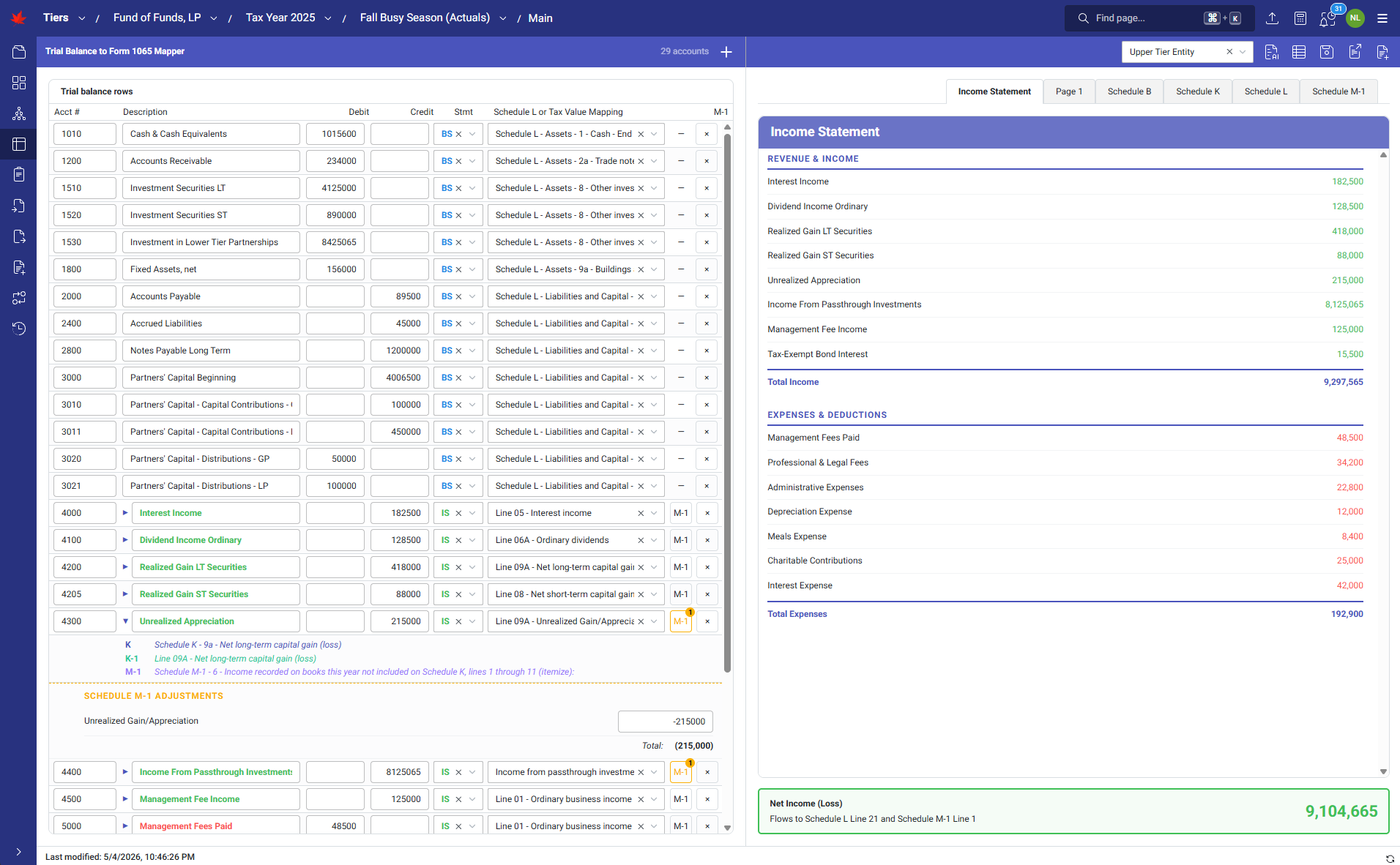
1 of 14 · Trial Balance to Form 1065
Click image or use arrows to browse.
01
Upload current-year trial balance
02
Compare against prior-year mappings
03
Classify accounts and suggest treatment for new accounts
04
Route values to Schedule L, Page 1, Schedule K, M-1, and M-2
05
Review mapping, adjustment, and reconciliation logic
06
Generate Form 1065 output
04The Shift
With TIERS, the trial balance does not disappear into a spreadsheet. It becomes the starting point for a controlled workflow where mappings are remembered, adjustments stay connected, reviewers can see what changed, and Form 1065 output remains tied to source.
What changes?
Prior-year treatment carries forward.
Teams do not have to re-decide every recurring account from scratch when prior-year mappings are available.
Mapping and adjustment logic stay connected.
Trial balance accounts, classifications, adjustments, and return outputs live in one reviewable workflow.
Review starts with evidence.
Reviewers can trace Form 1065 output back to the accounts, mappings, adjustments, and logic that produced it.
Engagement knowledge compounds.
The workflow remembers how the work was done, so the next return starts with more context, not another blank spreadsheet.
05Why TIERS
TIERS is not a generalist AI wrapper trying to guess its way through partnership tax.
The AI operator helps with mapping, reasoning, explanation, and workflow acceleration. The calculation core remains deterministic, governed, and traceable.
That means your team can move faster without losing the thing that matters most in partnership tax: proof.
01
Partnership-tax logic runs through governed calculation infrastructure, not model improvisation.
02
Every output can be traced back to source data, mappings, adjustments, and calculation logic.
03
TIERS helps surface the work. Tax professionals still review, decide, and own the return.
06Next Step
The fastest way to understand TIERS is to watch a number move from source account to Form 1065 output — mapped, reconciled, reviewed, and traceable.
Request a TIERS Demo→07FAQ